

Set up custom attributes in Okta
Map extra user attributes from Okta to Perk over SCIM, so profile data stays in sync automatically and you avoid duplicating it by hand.
Use this guide to map extra user attributes from Okta to Perk. Mapping attributes keeps profile data in sync automatically, so you avoid duplicating it by hand.
For the full attribute schema, see the SCIM user model reference.
Note: This is an advanced guide. Before you continue, complete the basic Okta SCIM configuration.
Prerequisites
Before you start, make sure you have:
- A completed basic Okta SCIM configuration. For more information, see Get started with Okta SCIM provisioning.
- Okta administrator access.
Add custom attributes
To add custom attributes, follow these steps:
- As an Okta administrator, go to Applications > Applications > TravelPerk.
- Select the Provisioning tab.
- At the bottom of the To App section, find the list of attributes and mappings.
- Select Go to Profile Editor.
- Select Add Attribute.
- Use the Supported attributes table below to enter the correct values. Only required fields are shown — fields such as Description are optional.
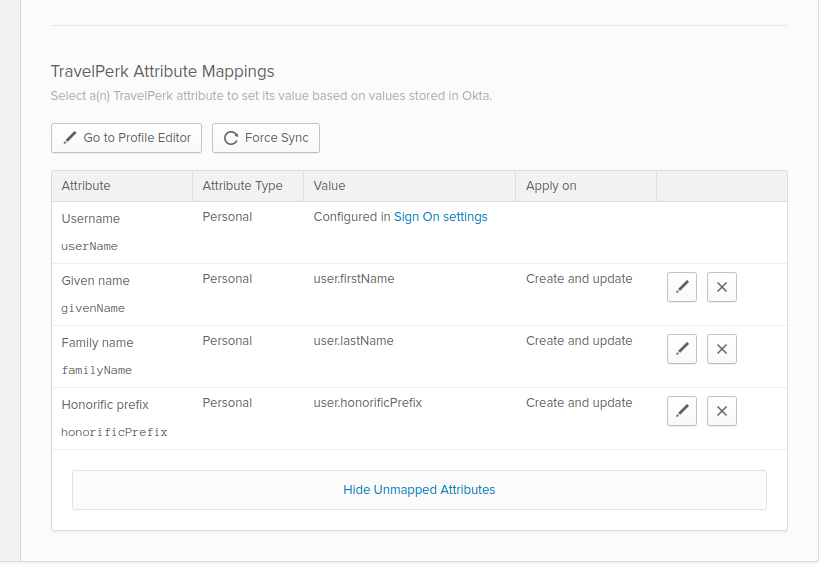
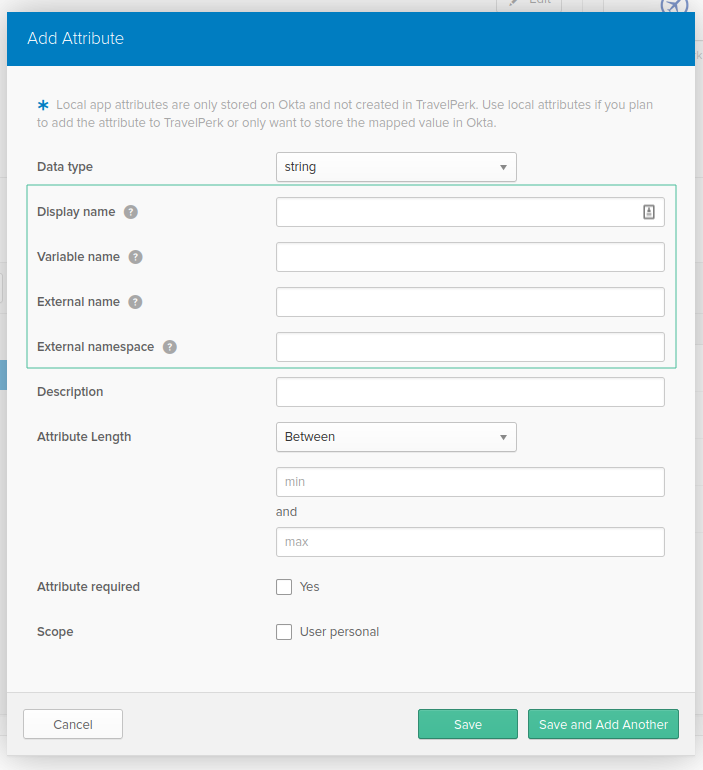
Once you've created the attributes you want to sync, map them to their Okta source:
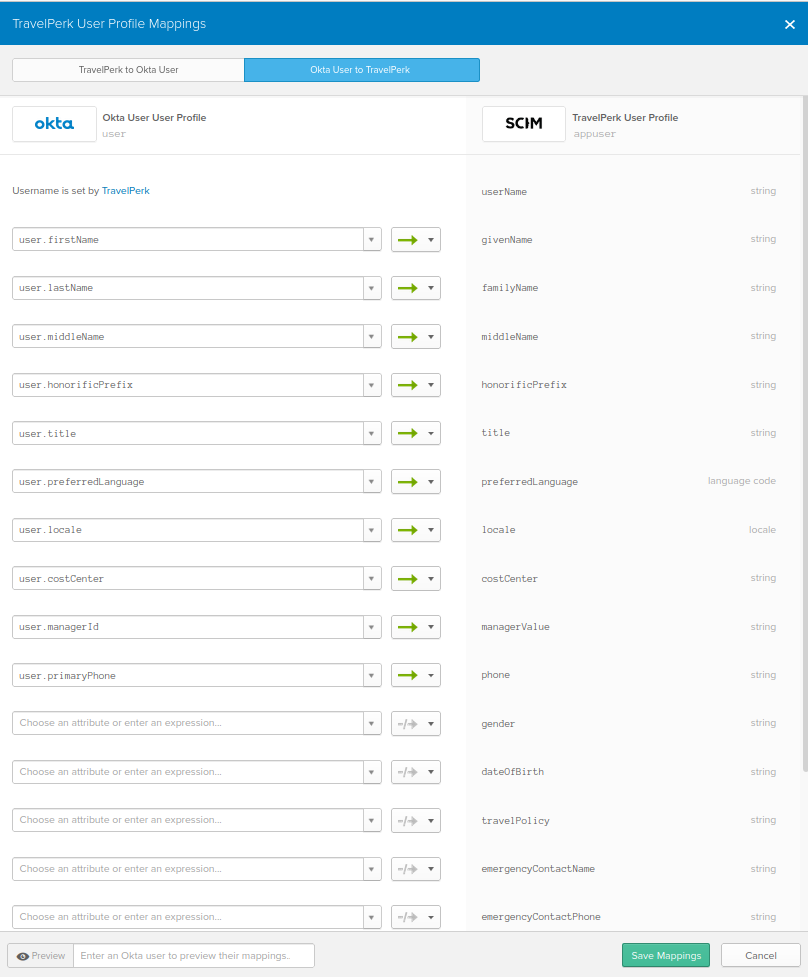
- Select Mappings.
- Select Okta user to Perk.
- Use the drop-down boxes on the left to choose which Okta attribute maps to each Perk attribute.
- Select Save.
NoteYou can leave some attributes unmapped. If you do, Okta prompts you to enter their value by hand when you assign the Perk app to a user.
Supported attributes
Perk supports the following attributes in its SCIM API. All data types are string unless noted.
| Attribute / display name | Notes | External name | Variable name | External namespace |
|---|---|---|---|---|
| Middle name | name.middleName | middleName | urn:ietf:params:scim:schemas:core:2.0:User | |
| Title | title | title | urn:ietf:params:scim:schemas:core:2.0:User | |
| Phone | phoneNumbers.^[type=='work'].value | phone | urn:ietf:params:scim:schemas:core:2.0:User | |
| Preferred language | See the supported locale values. | preferredLanguage | preferredLanguage | urn:ietf:params:scim:schemas:core:2.0:User |
| Locale | Defaults to en for British English. See the supported locale values. | locale | locale | urn:ietf:params:scim:schemas:core:2.0:User |
| Cost object | If a cost object with the given name isn't found, Perk creates it. | costCenter | costCenter | urn:ietf:params:scim:schemas:extension:enterprise:2.0:User |
| Employee number | employeeNumber | employeeNumber | urn:ietf:params:scim:schemas:extension:enterprise:2.0:User | |
| Emergency contact name | emergencyContact.name | emergencyContactName | urn:ietf:params:scim:schemas:extension:travelperk:2.0:User | |
| Emergency contact phone | emergencyContact.phone | emergencyContactPhone | urn:ietf:params:scim:schemas:extension:travelperk:2.0:User | |
| Travel policy | The name of the travel policy. It must already exist in Perk. See Define your travel policy. | travelPolicy | travelPolicy | urn:ietf:params:scim:schemas:extension:travelperk:2.0:User |
| Date of birth | The user's date of birth, in YYYY-MM-DD format. | dateOfBirth | dateOfBirth | urn:ietf:params:scim:schemas:extension:travelperk:2.0:User |
| Gender | Must be M, F, or empty. | gender | gender | urn:ietf:params:scim:schemas:extension:travelperk:2.0:User |
| Company | Must match the name of an existing company in Perk exactly. If the company doesn't exist, create it first. | company | company | urn:ietf:params:scim:schemas:extension:travelperk:2.0:User |
| Line manager email address | The email address of the user's line manager used to sign into the Perk platform. Use this field to assign a line manager by their email address. If you use it together with the manager field, lineManagerEmail takes priority. This field helps with systems that can't reference another object directly, such as Okta. | lineManagerEmail | lineManagerEmail | urn:ietf:params:scim:schemas:extension:travelperk:2.0:User |
| Unique ID | The unique code or identifier for each employee, such as an employee number. | uniqueId | uniqueId | urn:ietf:params:scim:schemas:extension:travelperk:2.0:User |
| Expense policy ID | policyId | policyId | urn:ietf:params:scim:schemas:extension:expense:2.0:User | |
| Creditor | creditor | creditor | urn:ietf:params:scim:schemas:extension:expense:2.0:User | |
| Legal entity ID | Company ID | legalEntityId | legalEntityId | urn:ietf:params:scim:schemas:extension:expense:2.0:User |
| Approval threshold | Limit up to which the user can approve. | approvalThreshold | approvalThreshold | urn:ietf:params:scim:schemas:extension:expense:2.0:User |
| Ignore manager in requests | Use to indicate that the SCIM API should ignore the manager attribute in the request.Allows Okta to sync user data without accidentally overwriting the manager/line-manager relationship managed elsewhere. | ignoreManagerInRequests | ignoreManagerInRequests | urn:ietf:params:scim:schemas:extension:expense:2.0:User |
Custom fields
Custom fields are account-specific attributes defined in Settings > Cost management > Custom fields. Unlike the attributes in the Supported attributes table, the external name and namespace are unique to your account and must be looked up before configuring them in Okta.
Each custom field maps to an attribute with the following format:
- External name:
cf_{slug}_{uuid}— where{slug}is the field name lowercased with non-alphanumeric characters replaced by underscores, and{uuid}is the field's UUID in Perk. - External namespace:
urn:ietf:params:scim:schemas:extension:perkcustomfields:2.0:User - Data type: String
To find the UUID, open the field in Perk (Settings > Cost management > Custom fields) — it appears in the URL:
https://app.perk.com/account/custom-fields/{uuid}
Add each custom field as a separate attribute in Okta's Profile Editor, using the same steps in described in Add custom attributes.
For a full walkthrough including payload examples and error behavior, see Provision custom fields via SCIM.
Map Okta fields to Perk
You control the Okta fields that map to the Perk attributes. The screenshot below shows an example configuration that you can adapt to your needs.
Next steps
Updated 2 months ago